Kayser Medienverlag · Creative Software for Windows
Every great film begins with an idea.
Turn your idea into a screenplay.
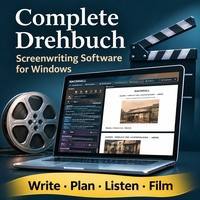
With Complete Drehbuch, you can transform your film ideas into structured screenplays, develop compelling scenes, write engaging dialogue and plan your film and video productions efficiently.
Whether you are creating a feature film, short film, documentary, corporate film or explainer video, Complete Drehbuch supports you from your initial idea to the finished screenplay.
Discover the Possibilities
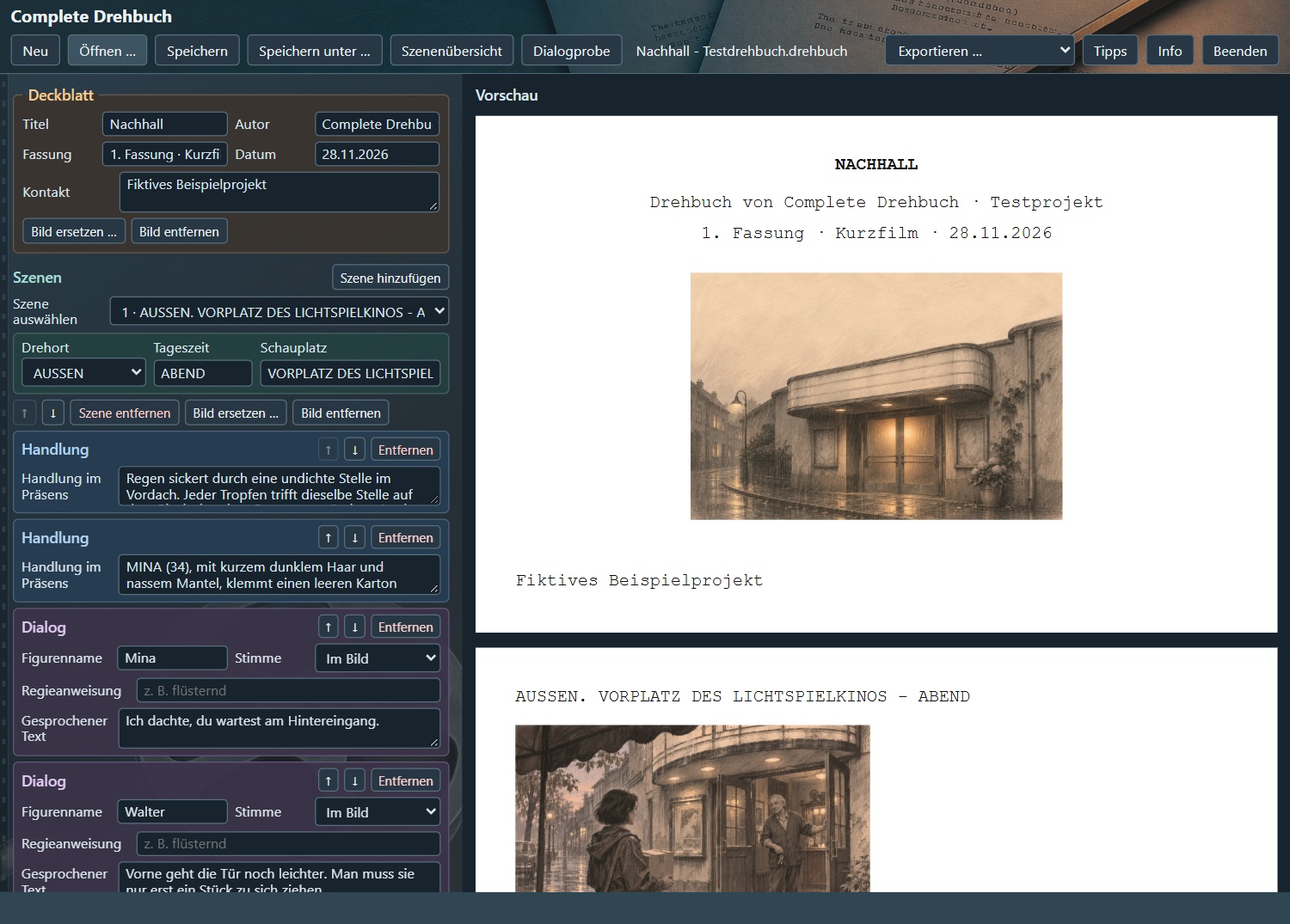
2
Script Formats
3
Export Formats
Live
Screenplay Preview
Audio
Dialogue Rehearsal
One Application · Two Creative Possibilities
The Right Script Format for Your Film Production
Not every film production requires the same script format. Complete Drehbuch offers two different project types designed to meet the various requirements of film and video production.
Feature Films · Short Films · Storytelling
The Traditional Screenplay
Develop your story scene by scene and focus on the action, characters and dialogue.
- Custom title page with title, author and image
- Scene headings with interior or exterior setting, time of day and location
- Action descriptions
- Character names and dialogue
- Performance directions
- Voice-over and off-screen dialogue
- Scene transitions
- Storyboard and reference images
- Formatted preview while writing
Corporate Films · Advertising · Documentaries
The Audiovisual AV Script
Plan the visual and audio elements of your video production side by side. Ideal for projects that require visuals, narration, music and sound effects to be coordinated.
- Two-column layout for video and audio
- Descriptions of individual camera shots
- Narration and commentary
- Planning of music, original sound and sound effects
- Individual duration for each shot
- Calculation of the total entered duration
- Integration of reference images
- Clearly organised shot planning
- Export as a two-column PDF or Word document
Write · Plan · Visualise
Keep Your Entire Story in View
Visual Scene Planning with Storyboard Images
Keep track of your story, even when working on more extensive screenplays. The integrated scene overview displays your scenes as clearly organised cards featuring locations, short descriptions and associated images.
Change the structure of your story, experiment with alternative scene sequences or introduce new ideas exactly where they belong.
- Scene cards with individual images
- Short descriptions for planning
- Rearrange scenes using drag and drop
- Insert new scenes at specific positions
- Duplicate existing scenes
- Direct access to the scene editor
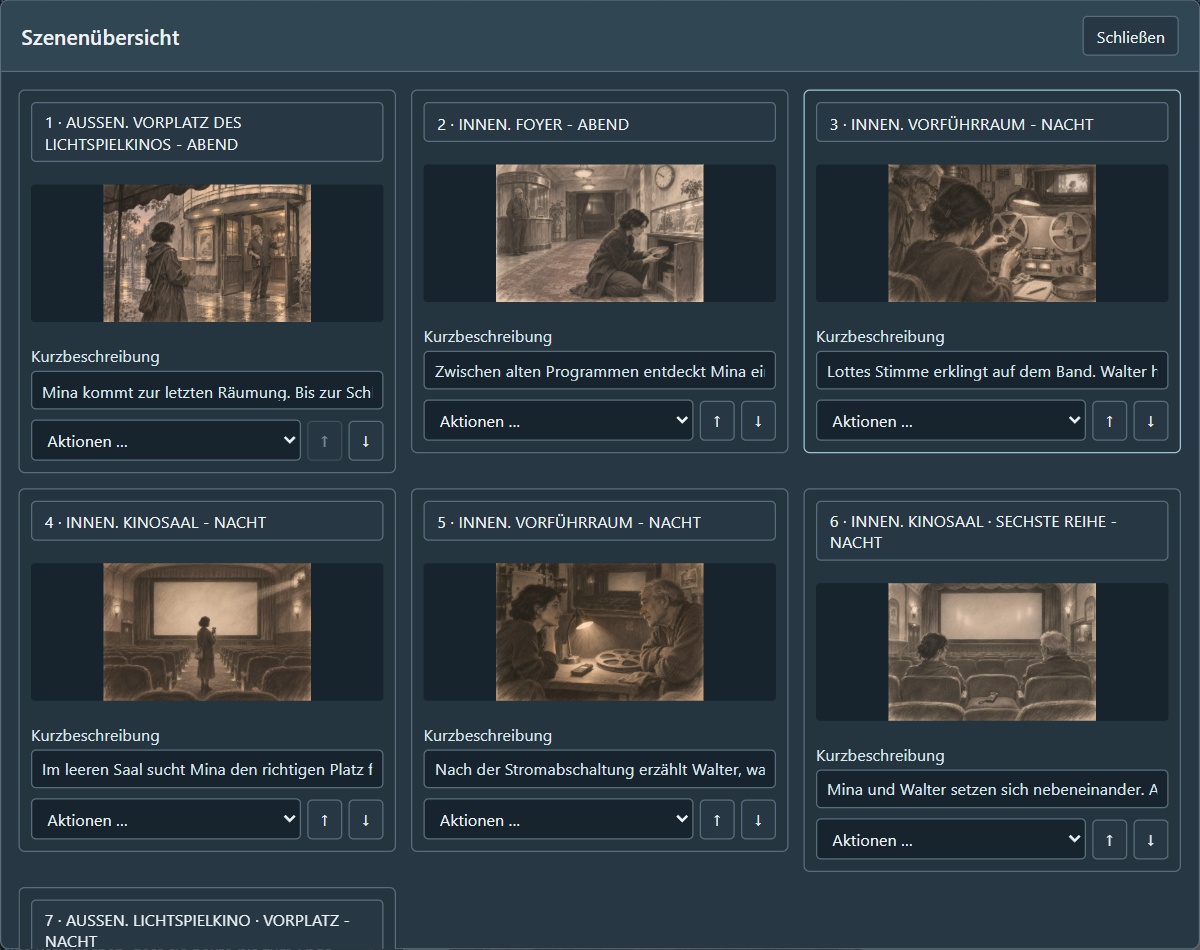 Scene overview with storyboard images and short descriptions
A Standout Feature
Hear Your Screenplay Before You Film It.
Does your dialogue sound natural? Do your characters respond convincingly to one another? Does the conversation develop the way you imagined it?
The integrated dialogue rehearsal feature allows you to listen to the spoken dialogue of a scene using different voices.
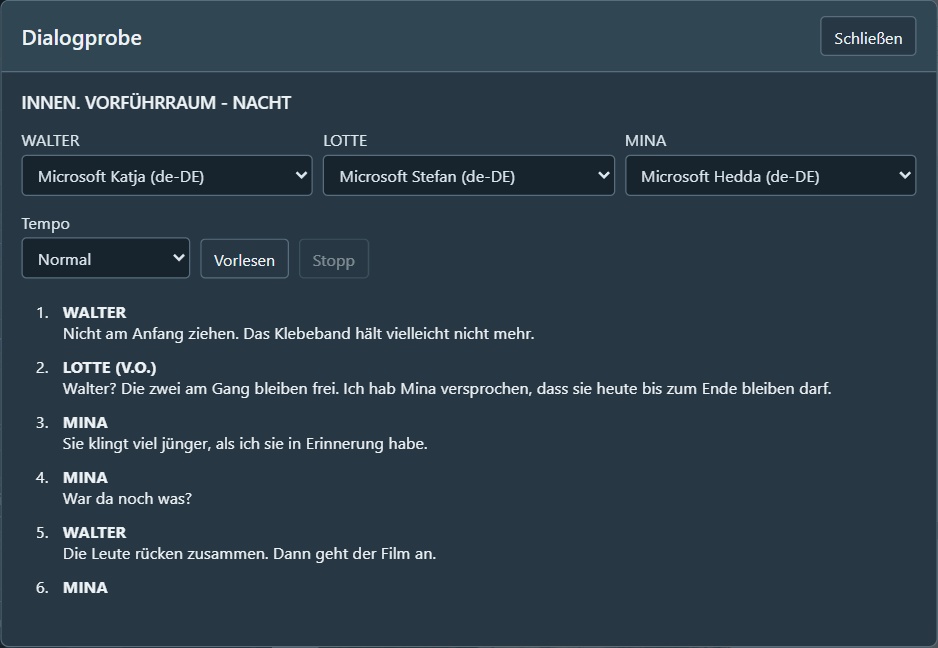 Dialogue rehearsal using different Windows text-to-speech voices
Bring Your Characters to Life
Assign different available Windows voices to your characters and listen to the dialogue in your scene.
Evaluate the flow of the conversation, identify unnatural phrasing and refine your dialogue before production begins.
- Individual voice selection for each character
- Three playback speeds
- Highlighting of the currently spoken line
- Listen to dialogue and stop playback at any time
- Offline playback with locally installed Windows voices
Ideal for creatively refining and improving your screenplay dialogue.
Professional Video Planning
Coordinate Visuals, Narration and Music
AV Scripts for Film and Video
A compelling corporate film or an effective explainer video relies on the interaction between visuals, narration, music and sound effects.
Complete Drehbuch allows you to organise these elements during the preparation of your production.
Describe what the camera shows in the left column and what the audience hears in the right column.
Specify the planned duration of individual shots and add suitable reference images.
This provides a clearly structured working document for filming, sound production and video editing.
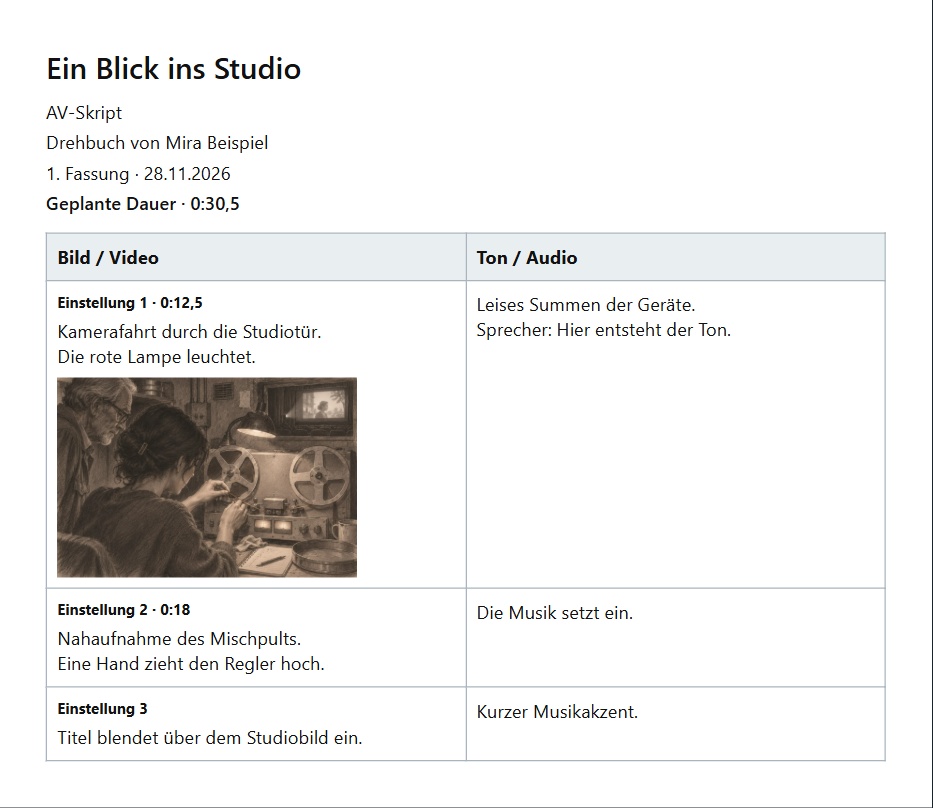 AV script featuring visual descriptions, audio, reference images and timing information
Save · Print · Share
From Your First Draft to the Finished Screenplay
Save your projects for further editing or export your finished screenplay to share it with actors, directors, camera operators, voice-over artists and other members of your production team.
PDF Document
Create a formatted screenplay for reading, printing and sharing. Embedded images and the two-column layout of AV scripts are preserved.
Microsoft Word – DOCX
Export your screenplay as an editable Word document, including embedded images and two-column AV script tables.
Text File – TXT
Create a plain-text version of your screenplay for use in other applications. Text exports do not contain images.
Complete Drehbuch – Project File
Save your entire project in the dedicated .drehbuch file format, including project information, scenes, shots and images, for further editing.
Focus on Your Creativity
Automatic Backup and Recovery
A great film idea should not be lost because of an unexpected application shutdown.
Complete Drehbuch creates a local automatic backup of your current work while you are editing.
If a backup is detected the next time you launch the application, you can restore it and continue working on your project.
Your manually saved project versions remain separate from the automatic backup. Continue to use the Save and Save As functions regularly.
Software for Creative Minds
Who Is Complete Drehbuch Designed For?
Filmmakers and Screenwriters
Develop stories, create scenes and write dialogue for your feature films and short films.
Video Producers and Advertising Agencies
Plan corporate films, product videos, commercials and business presentations using structured audiovisual scripts.
YouTubers and Content Creators
Prepare your video content, narration, camera shots and musical sequences in a clearly organised format.
Amateur Filmmakers and Film Students
Learn how a screenplay is structured and develop your own film projects step by step.
Explore and Get Creative
Discover Complete Drehbuch with the Sample Project “Nachhall”
The sample project “Nachhall” demonstrates how scenes, action, dialogue and storyboard images are combined in Complete Drehbuch, using a fictional short film as an example.
- Seven fully developed scenes
- Eight storyboard sketches
- Dialogue between different film characters
- Examples of scene structure and performance directions
- Opportunities to practise dialogue rehearsal and export functions
The application also provides helpful tips on how to write a screenplay.
All Key Features at a Glance
Complete Drehbuch 1.0 – Feature Overview
| Feature |
Description |
| Operating System |
Windows |
| Traditional Screenplay |
Scenes, action, characters, dialogue and transitions |
| AV Script |
Two-column planning of video and audio |
| Custom Title Page |
Title, author, draft version, date, contact information and image |
| Live Preview |
Formatted screenplay preview while editing |
| Scene Overview |
Visual scene cards with short descriptions and images |
| Scene Organisation |
Insert, duplicate and rearrange scenes |
| Storyboard Images |
Integration of your own reference images |
| Image Formats |
JPG, PNG and WebP |
| Dialogue Rehearsal |
Text-to-speech dialogue playback with individually selectable Windows voices |
| Speech Speed |
Slow, Normal and Fast |
| Dialogue Types |
On-screen, off-screen (O.S.) and voice-over (V.O.) |
| Timing and Duration |
Duration of individual AV shots and total of the entered durations |
| Project Format |
.drehbuch |
| Export Formats |
PDF, Word (DOCX) and TXT |
| Automatic Backup |
Local backup of the current working state |
| Project Recovery |
Restore a previously backed-up working state |
| Screenwriting Tips |
Integrated advice on writing screenplays |
| Sample Project |
Nachhall – seven scenes and eight storyboard sketches |
| Developer |
Kayser Medienverlag |
Questions and Answers
Frequently Asked Questions About Complete Drehbuch
What is Complete Drehbuch?
Complete Drehbuch is a standalone Windows application for writing traditional screenplays and creating audiovisual scripts for film and video productions.
Is Complete Drehbuch suitable for beginners?
Yes. The structured input of scenes, action and dialogue, combined with the live preview, makes it easier to get started. Integrated screenwriting tips and the sample project help you become familiar with the available features.
Can I add my own images to a screenplay?
Yes. You can use your own images for the title page, individual scenes and AV shots. This allows you to visualise storyboard sketches, locations or planned camera shots.
Can I listen to my screenplay dialogue?
Yes. The integrated dialogue rehearsal feature reads the spoken dialogue of a selected scene aloud. You can assign an available Windows voice to each character and adjust the speech speed.
Does dialogue rehearsal work without an internet connection?
Dialogue rehearsal also works offline when using locally installed Windows text-to-speech voices. The available voices depend on your Windows installation.
Can I save my screenplay as a PDF or Word document?
Yes. Complete Drehbuch supports export to PDF, Word documents and plain-text files. To continue editing within the application, you should also save your project in the dedicated .drehbuch file format.
What is the difference between a screenplay and an AV script?
A traditional screenplay focuses on scenes, action, characters and dialogue. An AV script displays video and audio side by side and is particularly suitable for corporate films, documentaries, advertising and explainer videos.
Can I use Complete Drehbuch for corporate films and YouTube videos?
Yes. The AV script format is particularly useful for planning camera shots, narration, music, sound effects and the timing of your video production.
Are my projects automatically backed up?
Complete Drehbuch creates a local backup while you are editing. If a backed-up working state is detected the next time you launch the application, it can be restored. Regular project files are still saved using the dedicated saving functions.




 0